Employers need trust.
Employees need freedom.
AI-powered time tracking that reads every workday, so you and your managers can operate at scale and look only where it's needed.
Time and productivity tracking solutions for agencies, BPOs or those who work with remote teams.
$9.99 per active agent, no charge for inactive seats · every feature
Your morning digest
Supplier team · yesterday · by emailPaul's day, in short
AI day story · 5:12 pmCustomer orders most of the morning, the team sync at eleven, the weekly report in Excel after lunch. 24 minutes idle. Nothing flagged.
Most managers of remote teams spend their day checking in
- What are you working on?
- Can you send me an update?
- When did you start today?
- How much time have you worked this week?
- Did you finish that task I assigned to you?
It's exhausting for the manager. It's worse for the agent. Nobody does their best work while being asked to prove they're working. So WorkdayTracker does the checking for you.
Trust
- By morning, every agent's day has been reviewed against their job description.
- See at a glance how everyone is doing, and open only the days that need attention.
- Know who has started their day, and whose day is worth a look.
- Your clients see the work for themselves, without asking you.
Freedom
- Start recording and get on with the day.
- No check-ins, no status updates, no justifying where the time went.
- A good day speaks for itself, and nobody interrupts it.
- Nothing invasive: no keystrokes, no webcam, no microphone.
- 250,000+
- hours recorded
- 16 million+
- screenshots analyzed
Run a team of 100 the way you ran a team of 10.
We judge the work, not the mouse.
-
Record
The desktop app starts with the agent's working hours and tracks time to the second, with screenshots and the app in focus. No timers, no pop-ups.
-
Read
AI reads every half hour against the agent's job description and tells the story of the day.
-
Tell
You hear how everyone's day is going without asking, and the agents are left alone to work.

Built with the agencies that use it
I'm Tobias, founder of WorkdayTracker. We've been building it since 2012, side by side with the agencies that rely on it every day.
Need something specific for your agency? Tell us in the demo. That's how we decide what gets built next.
Book a demoTime tracking that runs itself
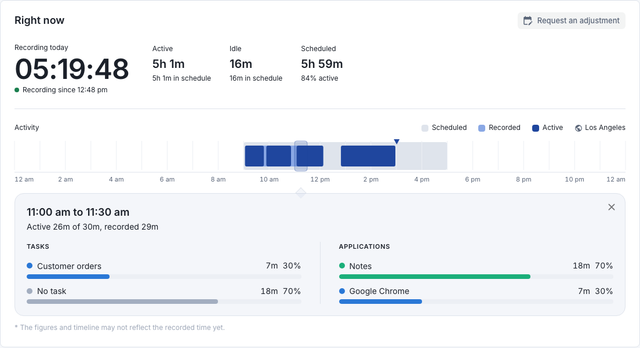
Agents don't start timers and nobody types a timesheet. The desktop app follows each agent's working hours and records the day to the second, online or offline. Every hour you bill starts here.
- To the second
- active and idle
- Automatic
- follows the schedule
- Offline
- uploads later
Today
Paul Revere · recording since 9:00 amEvery half hour, read against the job
Describe each agent's job once. The AI looks at what was on screen and tells you how much of every half hour was that job. The screenshots behind each reading are one click away.
- Relevance
- a percent per half hour
- Day story
- written, and read aloud
- Screenshots
- behind every reading
Reports your clients open themselves
Send a link instead of assembling proof. The client sees the hours, the reading of each day and, if you choose, the screenshots. No account needed.
- Sharing
- one link, no account
- Contents
- you choose what it shows
- Download
- from the report itself
Sales team for Acme Corp
Shared report · 5 to 11 OctoberFrom timesheets to billable hours, for as many clients as you have
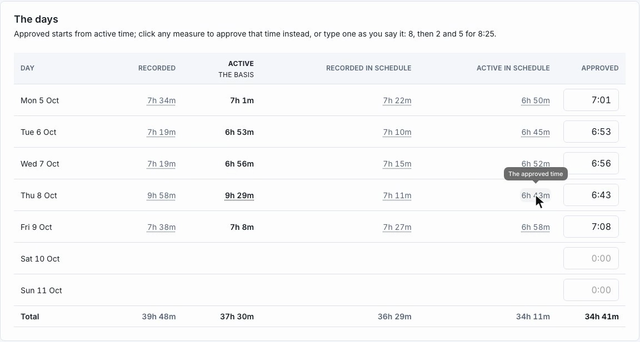
Every client bills differently. Set each client's rules once and approve the timesheet period. The billable hours are worked out for you, so nobody retypes a number.
- Rules
- set once per client
- Approval
- a whole period at once
- Billable hours
- worked out for you
And the rest of running an agency
Notifications
Know when your agents have started their day, right away or in one morning digest.
Fraud detection
A mouse jiggler can move the mouse. It can't do the work. Faked activity gets a flag, with the screenshots beside it.
Attendance and schedules
Every team on its client's hours, in any timezone. Late starts and overtime show up on their own.
Messages
Send a message to a team or one agent. It lands in the app they already have open, and you see who has seen it.
Time corrections
Forgot to start the app? The agent asks for the time to be added, and their manager approves it.
Set up once per client
Every client gets its own team and its own settings. Change one without touching the others.
Invoices and payroll
Approved hours go straight to the invoicing and payroll tools you already use.
Ask your data
Ask the built-in assistant a question like "who was late this week?" and get the answer.
Connects to your tools
An API and Zapier, for everything else your agency runs on.
Works with Slack · Jira · Asana · Trello · Google Calendar · QuickBooks · Xero · Gusto · Wise · Deel · Zapier
Fewer check-ins. Left alone to do the work.
Agents don't report on their day. They finish the task, hand in the work, and it speaks for them.
Hand in the work
Finish a task and attach what came out of it: a file, several files or a note. The answer is there before anyone asks.
Their own hours and tasks
Every agent sees their own time, their timesheet period and what's on their list.
Recorded only while working
The app follows their working hours. When it's stopped, nothing is recorded, and no pop-up asks if they're there.
Built to hold other people's screens
Access
Six roles. Managers see only their own teams. Access can be revoked in an instant.
Accountability
An activity log of every change and every view of an agent's data.
Data
Hosted in the United States. Never used to train AI models.
Privacy
Screenshots blurred on the device and window titles redacted, wherever a client needs it.
Encryption
AES-256 at rest and TLS in transit, on every connection.
Data centers
Independently audited for SOC 2 and ISO 27001, with physical security around the clock.
Backups
Daily backups, kept apart from the live data.
Network
Protected against denial-of-service attacks. Monitored around the clock, with a public status page.
Proof of work, not proof of presence
| WorkdayTracker | Others | |
|---|---|---|
| What it measures | The work on screen, against the job | Keyboard and mouse activity |
| The story of each agent's day | Yes, read aloud if you like | No |
| Time tracking | Starts and stops with the schedule | A timer the agent starts and stops |
| Screenshots | Every 30 seconds, every monitor | A few per 10 minutes |
| Faked activity | Flagged, with a review trail | Top plans or a paid add-on |
| Report link clients open themselves | Yes | Client logins on top plans, or none |
| What you pay for | Agents who worked that month | Every seat, used or not |
| Price | $9.99 per active agent, every feature | Per seat and by plan, add-ons extra |
Others: the public feature and pricing pages of widely used time trackers, October 2026.
You pay for agents who worked. Not for seats.
Other trackers bill every seat you set up, used or not. WorkdayTracker counts the agents who recorded time that month. Someone on leave, between clients or gone costs nothing.
- Unused seats
- cost nothing
- Minimum
- no minimum seats
- Add-ons
- none, every feature
October's recorded time
10 agents on your list- Paul31h
- Deborah35h
- Betsy30h
- John31h
- Nathan28h
- Mercy27h
- Abigail12h
- Benjaminleave
- Thomasleft
- Samuelno time
The bill for October
$30.07 less for the same month of work
- Every feature, the AI included
- Set up with you on a call
- A review of what it found, together
- Your data carries over
- AI review of every day, its story, fraud detection
- Notifications on your channel of choice
- Screenshots every 30 seconds, day replay
- Schedules, timesheets, billable hours
- Client reports, the assistant, integrations
An active agent is one who recorded time that month. Managers, admins and clients are never billed. Over 200 agents? Ask about volume pricing.
Questions
How do we start?
Book a 20-minute demo. If it fits, we set up a free two-week pilot with your own agents on a call, and look at what it found together at the end.
What counts as an active agent?
An agent who recorded time in the billing month. Agents on leave or gone are not billed. Managers, admins and clients are never billed.
What does the AI read, and what does it do with it?
The screenshots of each half hour, against the agent's job description. It marks what was the job, tells the story of the day and flags faked activity. Screenshots are never used to train AI models.
What does the desktop app record?
While it runs: a screenshot about every 30 seconds of every monitor, the app and window title in focus, whether the keyboard or mouse was used each second, and the task the agent chose. Web addresses only if you turn them on. Never keystrokes, the webcam or the microphone, and nothing when stopped.
What do agents see?
Agents see their own time: today's hours and timeline, the timesheet period and their tasks, and can request an adjustment when a day is wrong. Screenshots and the AI's reading are for their managers.
Can my clients see the reports?
Yes. Share a link to an agent's day or a range. The client opens it without an account, and you choose what it shows.
Which computers does the desktop app run on?
Mac, Windows and Linux computers that meet these requirements. The web app works in any current browser.
- Operating system: macOS 11 or later, Windows 10 or 11 (64-bit), or Linux (64-bit, Ubuntu 24.04 or newer)
- Processor: Intel Core i3, AMD Ryzen 3, Apple M1, or better
- Memory: 4 GB
- Disk space: 500 MB free
- Internet: needed to upload, and recording continues without it
Is there a contract?
No. Billing is monthly for the agents who worked, and you can stop at any time.
See a manager's morning with it.
A 20-minute demo, then a free two-week pilot with your own agents.