Time tracking Time tracking that runs itself
Agents don't start timers and nobody types a timesheet. The desktop app follows each agent's working hours and records the day to the second. Everything else is built on that record.
- To the second
- recorded, active and idle
- Automatic
- starts and stops with the schedule
- Offline
- keeps recording, uploads later
Today
Paul Revere · recording since 9:00 amNo timer to forget
The app starts when the agent's working hours begin and stops when they end. An agent opens the laptop and works. The hours you bill don't depend on someone remembering to press a button.
Active and idle, measured
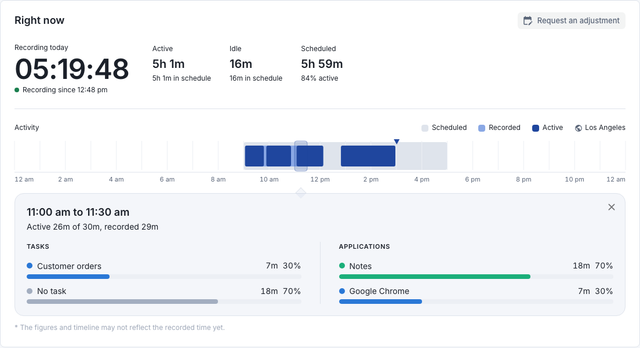
Every second is recorded as active or idle. Stepping away is idle time, nothing more, and no pop-up asks the agent to confirm they're there.
- Idle time
- after a pause you choose
- Limits
- per day and per week
- Overtime
- called out
Time per task, app and site
The agent picks the task they're on. Time lands on that task, and on the apps and sites in focus. When the task is done, they hand in the work: a file, several files or a note.
Today's tasks
Paul Revere · 15 OctoberKeeps going when the internet doesn't
Recording continues offline and uploads when the connection returns. The app keeps itself up to date, so nobody chases installs.
The agent's own time
Each agent sees today, the timesheet period and where each task's time went, in their own timezone. When a day is wrong, they ask for a correction and their manager approves it.
Your week
Paul Revere · 5 to 11 OctoberQuestions
Do agents have to start and stop a timer?
No. The desktop app follows the working hours you set. Agents can also start and stop it themselves.
What happens when an agent loses their connection?
The app keeps recording and uploads the time when the connection returns.
Which computers does it run on?
Mac, Windows and Linux computers that meet these requirements.
- Operating system: macOS 11 or later, Windows 10 or 11 (64-bit), or Linux (64-bit, Ubuntu 24.04 or newer)
- Processor: Intel Core i3, AMD Ryzen 3, Apple M1, or better
- Memory: 4 GB
- Disk space: 500 MB free
- Internet: needed to upload, and recording continues without it
See a manager's morning with it.
A 20-minute demo, then a free two-week pilot with your own agents.